Overview
Configured a voice-enabled Copilot Studio bot to greet callers, present region-based menu options, and route callers according to their selections. The implementation uses an Adaptive Dialog with conversation-start logic, closed-list questions, conditional branching, and subflow navigation to manage the caller journey.
The primary objective is to provide a structured call experience, allowing callers to select their region, navigate to the main menu when required, and route voicemail requests to the appropriate queue.
Detailed Resolution Steps:
Step 1 – Configure Conversation Start
Configured the bot using an OnConversationStart trigger to initiate the voice interaction when a conversation begins.
- Added a welcome message using the bot’s dynamic name.
- Configured text and speech responses to support the initial greeting.
- Introduced the region selection question to determine the caller’s preferred routing path.
Example greeting:
“Hello and thank you for calling [Bot Name], powered by generative AI. How may I help you today?”
Step 2 – Configure Region Selection
Configured a closed-list question to capture the caller’s region through voice input or keypad selection.
The region selection menu contains the following options:
- East – Keypad option 1
- North – Keypad option 2
Stored the caller’s selection in Topic.Var1 for use in subsequent conditional logic.
This allows the bot to identify the selected region and execute the corresponding branch of the conversation flow.
Step 3 – Implement Conditional Branching
Configured a ConditionGroup to evaluate the selected region and determine the next action.
- East: Defined a separate conditional branch for the East region.
- North: Configured the next set of menu options for callers selecting the North region.
The conditional branching mechanism ensures that the bot follows the appropriate conversation path based on the caller’s selection.
Step 4 – Configure the North Region Subflow Menu
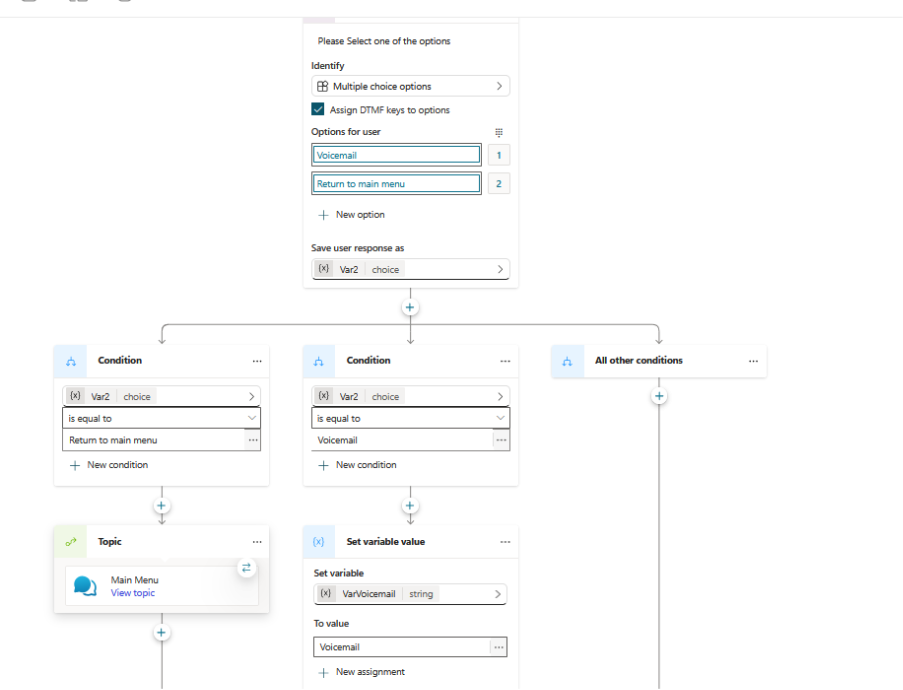
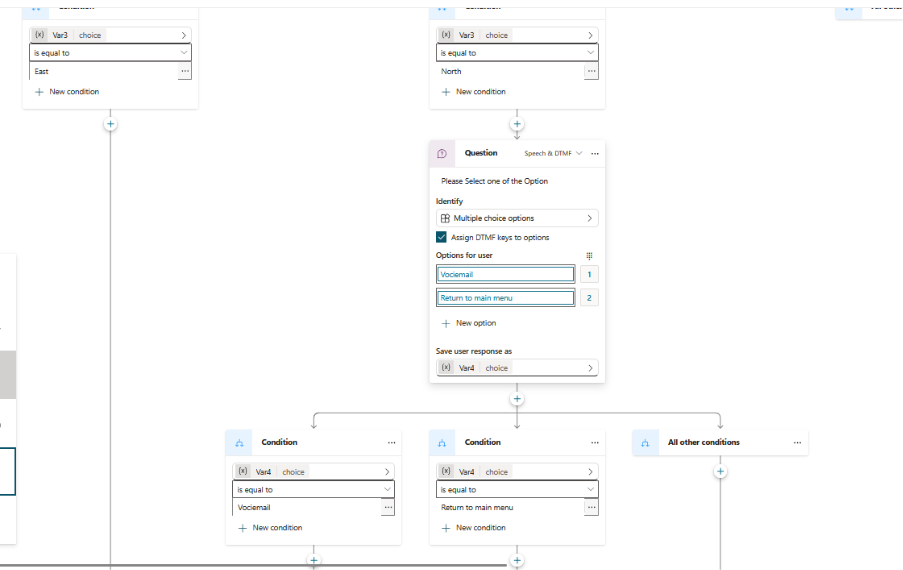
For the North region, configured a secondary menu using another closed-list question.
The menu provides the following options:
- Voicemail – Keypad option 1
- Return to main menu – Keypad option 2
Stored the selection in Topic.Var2 to evaluate the caller’s choice and determine the next step.
This secondary menu acts as a subflow within the main conversation, allowing callers to access voicemail routing or navigate back to the main menu.
Step 5 – Implement Main Menu Navigation Using a Subflow
Configured a conditional branch to handle the Return to main menu selection.
When the caller selects this option, the bot executes a BeginDialog action and invokes the MainMenu topic.
This mechanism enables the current dialog to transfer control to a reusable main menu topic instead of duplicating the menu logic within the existing conversation flow.
The subflow-based approach helps maintain a structured dialog design and simplifies future updates to the main menu.
Step 6 – Configure Voicemail Routing Logic
Configured a conditional branch to identify when the caller selects the Voicemail option.
When this option is selected:
- Set the Topic.VarVoicemail variable to Voicemail.
- Triggered a speech activity to communicate the next response to the caller.
- Established the voicemail selection as the basis for the subsequent voicemail-handling and queue-routing process.
This separates the caller’s menu selection from the subsequent routing logic, making the flow easier to extend and maintain.
Queue routing: The provided dialog code establishes the voicemail selection and initiates a speech response. The actual transfer to a specific queue is not shown in the supplied code and must be configured in the subsequent routing or transfer logic.
Step 7 – End-to-End Call Flow
The configured conversation follows this sequence:
- The bot greets the caller.
- The caller selects a region: East or North.
- The North branch presents the voicemail and main menu options.
- If the caller selects Return to main menu, the bot invokes the MainMenu topic through BeginDialog.
- If the caller selects Voicemail, the bot sets the voicemail variable and initiates the configured speech response.
- The subsequent routing logic can use the voicemail selection to direct the call to the designated queue.
Expected Outcome:
The voice bot provides a structured, menu-driven calling experience using Copilot Studio Adaptive Dialogs. Region selection determines the conversation path, the secondary menu handles voicemail and main menu navigation, and the BeginDialog action enables reusable subflow execution.
The design provides a foundation for extending the voice bot with queue-specific voicemail routing, additional regional menus, and further call-handling scenarios.