When you want to make use of data from collections and use it across the canvas app, we need
to make use of global variable set from Collections.
High level resolution steps
- I want to create sales order header and after header is created, I don’t want to show output in
gallery but in different label or textinput in view mode in canvas app
Detailed resolution steps
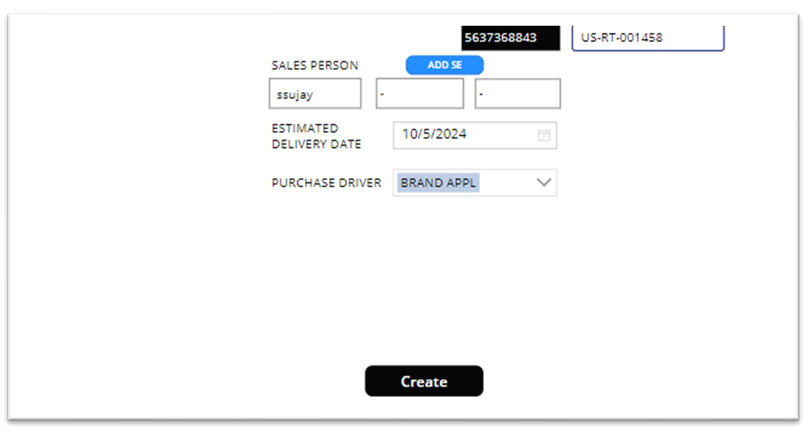
Step 1: Fill up the fields and hit on “Create” button and these fields will act as input for the API.

Step 2: Now “Onselect” property of “Create” button add the below code to get the data into
collection.
OnSelect Property of Create button
Set(headsales,Defaulttitle.headerordercreation({_contract:{
    CampaignId:Label_purchasedriver_1.Text,
    estimatedDeliveryDate:Label_estimateddate_1.Text,
    SalesExecutive1:varSalespersonId1,
    SalesExecutive2:varSalespersonId2,
    SalesExecutive3:varSalespersonId3
},
'access-token':tokenstore.Text
}));
Above code represents the request body for the API that helps you to create a sales order header
collection data.
Step 3: After API I’m setting the variable for “sales order header” and “recid”.
OnSelect Property of Create button
 Set(SalesId, headsales.SalesId);
 Set(SalesRecId, headsales.SalesRecId);
In the above code I’m setting the global variable and it can be used across the canvas app.
Step 4: After setting up the variable we have to use that variable in “label” and “textinput” for that
we need to set the variable name in Default property of the “label” and “textinput”.
Output
When I click on “Create” button, “sales order header” and “recid” got created as global variable.