How to work on containers and its functions?
Scenario: By using container functions, here I am explaining how to add, modify, remove and search for email address.
High Resolution steps
- Create the container for storing the Email-Id.
- Using ConIns function to insert the multiple email-Id’s.
- Using ConPoke Function to viewing the elements in the Container.
- Using ConDel to delete the one or more elements from the container.
- Using Confind to locates the first occurrence of an element or a sequence of elements in a container.
- Using ConLen to get the container length.
- Using ConNull to retrieves an empty container.
- Using ConPeek to get the container content by index.
Detailed Resolution steps
Step 1: Create the runnable class to store the multiple Email-id’s in the container.
Code Snippet:
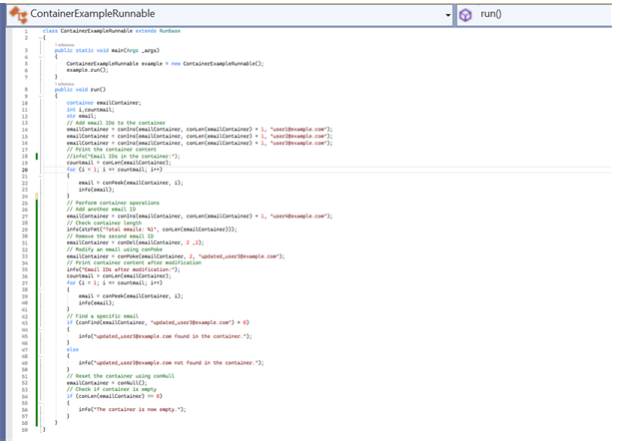
Code:
class ContainerExampleRunnable extends RunBase

{

    public static void main(Args _args)

    {

        ContainerExampleRunnable example = new ContainerExampleRunnable();

        example.run();

    }

    public void run()

    {

        container emailContainer;

        int i,countmail;

        str email;

        // Add email IDs to the container

        emailContainer = conIns(emailContainer, conLen(emailContainer) + 1, "user1@example.com");

        emailContainer = conIns(emailContainer, conLen(emailContainer) + 1, "user2@example.com");

        emailContainer = conIns(emailContainer, conLen(emailContainer) + 1, "user3@example.com");

        // Print the container content

        //info("Email IDs in the container:");

        countmail = conLen(emailContainer);

        for (i = 1; i <= countmail; i++)

        {

            email = conPeek(emailContainer, i);

            info(email);

        }


        // Perform container operations

        // Add another email ID

        emailContainer = conIns(emailContainer, conLen(emailContainer) + 1, "user4@example.com");

        // Check container length

        info(strFmt("Total emails: %1", conLen(emailContainer)));

        // Remove the second email ID

        emailContainer = conDel(emailContainer, 2 ,2);

        // Modify an email using conPoke

        emailContainer = conPoke(emailContainer, 2, "updated_user3@example.com");

        // Print container content after modification

        info("Email IDs after modification:");

        countmail = conLen(emailContainer);

        for (i = 1; i <= countmail; i++)

        {

            email = conPeek(emailContainer, i);

            info(email);

        }

        // Find a specific email

        if (conFind(emailContainer, "updated_user3@example.com") > 0)

        {

            info("updated_user3@example.com found in the container.");

        }

        else

        {

            info("updated_user3@example.com not found in the container.");

        }

        // Reset the container using conNull

        emailContainer = conNull();

        // Check if container is empty

        if (conLen(emailContainer) == 0)

        {

            info("The container is now empty.");

        }

    }

}
Step 2: Container Functions which is used to add, modify, remove, and search the elements within container.
1. conIns(container, index, value)
- Purpose: Inserts a value at a specific position in the container.
- Operation in Code: The code inserts email addresses into the container one by one using conIns().
| emailContainer = conIns(emailContainer, conLen(emailContainer) + 1, “user1@example.com”); |
Output: The container emailContainer now holds one email: “user1@example.com”.
2. conLen(container)
- Purpose: Returns the length of the container, i.e., the number of elements in it.
- Operation in Code: The code uses conLen() to determine the number of email addresses in the container.
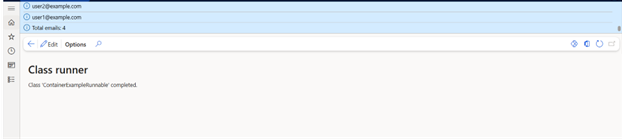
| info(strFmt(“Total emails: %1”, conLen(emailContainer))); |
Output: The length of the container at this point will be 4, as four email addresses are inserted.

3. conPeek(container, index)
- Purpose: Retrieves the value at a specific index in the container.
- Operation in Code: The code uses conPeek() to loop through the container and print each email address.
| email = conPeek(emailContainer, i); info(email); |
Output: The email addresses in the container are printed.
4. conDel(container, startIndex, count)
- Purpose: Deletes a specified number of elements from the container starting at a given index.
- Operation in Code: The code removes the second email address from the container.
| emailContainer = conDel(emailContainer, 2 ,2); |
Output: The second email address (“user2@example.com”) is removed from the container.
5. conPoke(container, index, value)
- Purpose: Modifies the value at a specific index in the container.
- Operation in Code: The code modifies the third email address in the container.
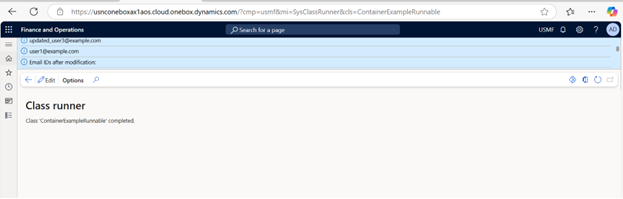
| emailContainer = conPoke(emailContainer, 2, “updated_user3@example.com”); |
Output: The email at index 2 is updated to “updated_user3@example.com”.
6. conFind(container, value)
- Purpose: Finds the first occurrence of a specified value in the container. Returns the index if found, or 0 if not found.
- Operation in Code: The code searches for the email “updated_user3@example.com” in the container.
if (conFind(emailContainer, "updated_user3@example.com") > 0)

{

    info("updated_user3@example.com found in the container.");

}

else

{

    info("updated_user3@example.com not found in the container.");

}
Output: Since the email is found, it will show in the container.

7. conNull()
- Purpose: Resets the container, effectively clearing its content.
- Operation in Code: The code clears the emailContainer by calling conNull().
| emailContainer = conNull(); |
Output: It will display null values in the container.

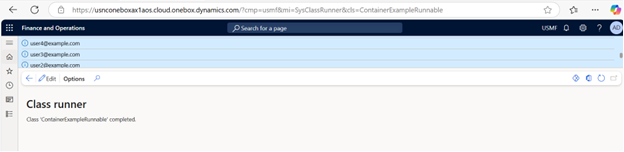
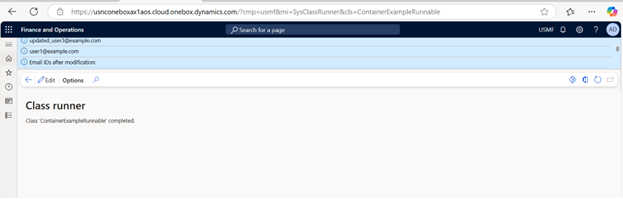
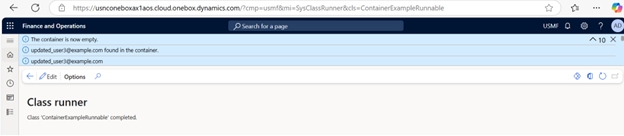
OUTPUT
Once the runnable class is completed,
it is creating, modifying, finding and deleting as shown in the below screenshot.