Unable to Create Project on Visual studio 2022 for Finance Operation Template – Fix
- While creating visual studio project, with Finance operation template there was an issue.
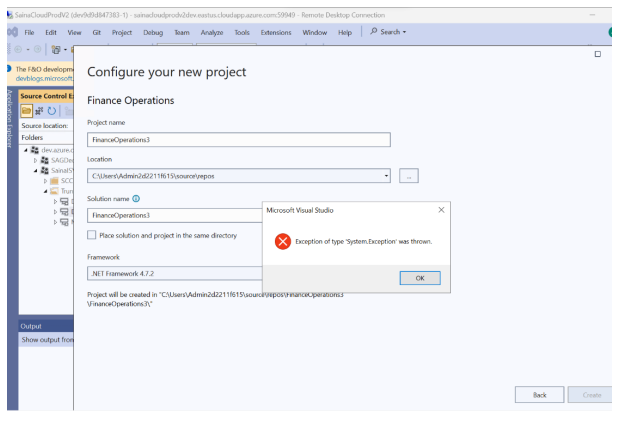
- Error Message: “Exception of type ‘System.exception’ was thrown.”
- Unable to create a project on Visual studio 2022
High level resolution steps
- DLL file was missing.
- Repair the VS, from program files on control panel.
- Missed file has been imported, and restart the visual studio.
Detailed resolution steps
Step 1: Error Message
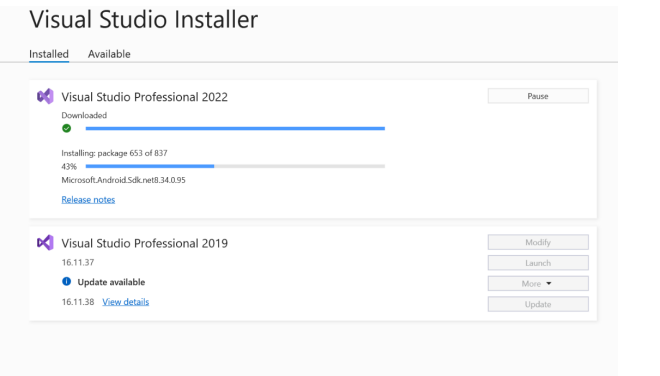
Step 2: Navigate to Program files on control panel, and repair the Visual studio, by updating all the tools.
Step 3: Once after step 2 if the error is not resolved. Try open any of the existing project, you will find the exact error message on the output screen.
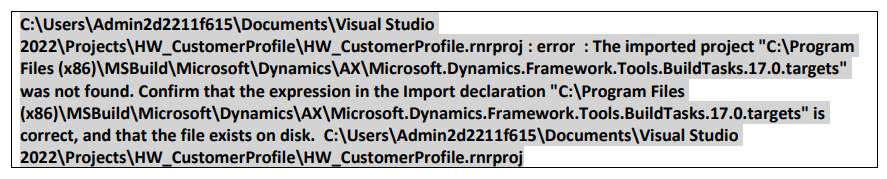
Step 4: Navigate to the specific path (C:\Program Files (x86)\MSBuild\Microsoft\Dynamics\AX), and find whether the missing file (Microsoft.Dynamics.Framework.Tools.BuildTasks.17.0.targets) is there?
Step 5: Not Found, picked it from another existing environment, and added to the specific path.
Step 6: Restart visual studio and try creating the new project. Able to create it successfully.
Step 7: Attached the missed file, if needed for any further reference. (Optional)