How To Convert Data URI To String Format
Power FX expression for converting dataUriToString() .
This scenario is mainly used to find the name and location of a resource file that is in a uniform format for websites.
High-level resolution steps
The given input gets converted from text to dataUri format with the compose action.
Then, the converted dataUri format gets converted to a string format with another compose action.
Detailed resolution steps
Step 1
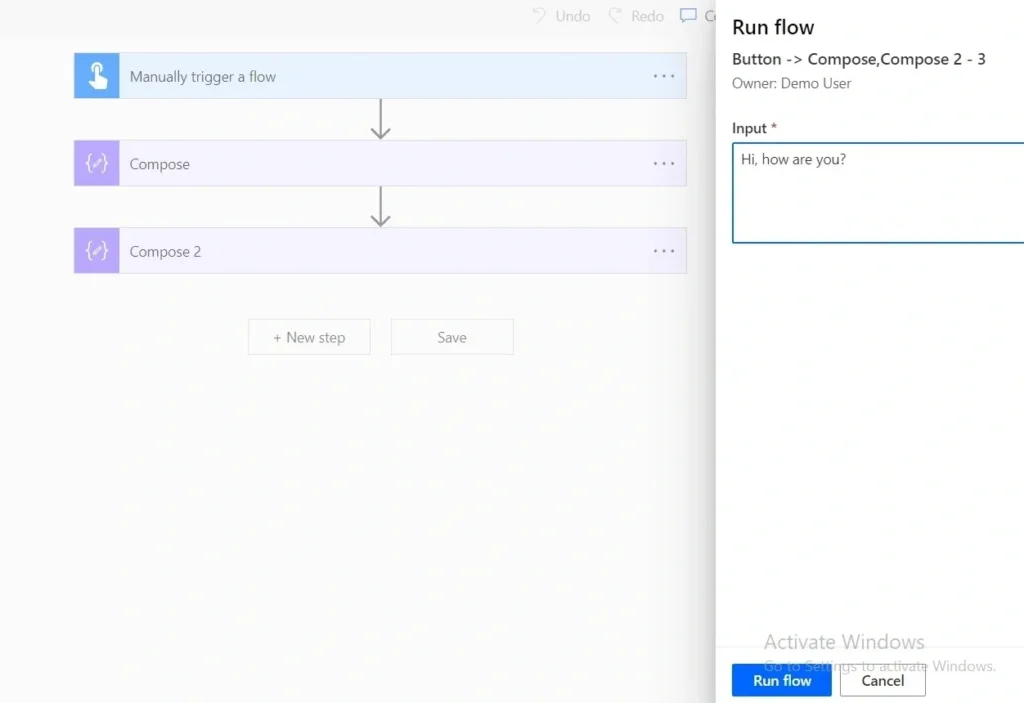
Add a “manually trigger flow” in Power Automate, click on add input.

Step 2
Add compose as an action (‘+’button) , under the input dialog box, the expression tab will be available, and then type: dataUri(triggerBody()[‘text’]).

Step 3
Add another compose as action (‘+’ button) under the input dialog box, the expression tab will be available, and then type: dataUriToString(outputs(‘Compose’)) as shown below.

Step 4
Then save and run the flow with input example “Hi, how are you?”.
Output
We get output in the form of a dataUri where,
(data:text/plain is data:content/type,
charset=utf-8 is a character encoding system to represent as ASCII text,
base64 ‘converts binary data to text’ and
SGksIGhvdyBhcmUgeW91Pw == is for input Hi, how are you?).

After converting the input to a dataUri() form. When we use the compose of dataUriToString() form, it returns in the form of a string for output as shown below.