Introduction
Microsoft Dataverse is the underlying data platform for Dynamics 365 and Power Apps. While Model-Driven Apps provide forms and views for interacting with data, developers often need to perform operations programmatically.
Typical requirements include:
- Create records automatically
- Update related records
- Retrieve additional information
- Delete records
- Execute custom business logic
Instead of writing server-side code for every requirement, Microsoft provides the Dataverse Web API, which can be accessed in client-side JavaScript through the Xrm.WebApi object.
What is Dataverse Web API?
Dataverse Web API is a RESTful API that allows applications to communicate with Microsoft Dataverse using standard HTTP methods.
It supports:
- Create
- Retrieve
- Update
- Delete
- Associate records
- Disassociate records
- Execute Actions
- Execute Functions
The JavaScript Xrm.WebApi library is simply a wrapper around this REST API.
Scenario
Synchronize Customer Information from an External System
Many organizations maintain customer data across multiple business applications, such as SAP, Oracle, Workday, and customer self-service portals. To avoid manual updates and ensure data consistency, the client requires a “Sync Contact Details” button in the Model-Driven App.
When the user clicks the button, the application retrieves the latest contact information from the external system and updates the Contact record in Dataverse using Xrm.WebApi.updateRecord().
Because the update is performed through the Dataverse Web API:
- The logged-in user’s security permissions are respected.
- All synchronous plugins execute.
- Business Rules are evaluated.
- Power Automate flows and workflows configured for Contact updates continue to
run. - The user receives immediate feedback without navigating away from the current
page.
This approach reduces manual effort, minimizes data entry errors, and keeps Dynamics 365 synchronized with enterprise systems while leveraging the platform’s existing business logic.
Solution
When the user clicks the custom button, JavaScript retrieves the latest customer information from the external system (or uses values already available on the page) and updates the Contact record using the Dataverse Web API.
The update is performed without opening the record in edit mode or refreshing the entire application.
JavaScript Implementation:
| var data = { firstname: “Alexx”, lastname: “Bakerrr” }; Xrm.WebApi.updateRecord( “contact”, “80ac35a0-01af-ea11-a812-000d3a8b3ec6”, data ).then( function success(result) { console.log(“Record has been updated successfully.”); }, function(error) { console.log(error.message); } |
Real-Time Testing Using Browser Developer Tools
During development, you may want to validate your JavaScript without creating a web resource or deploying a solution.
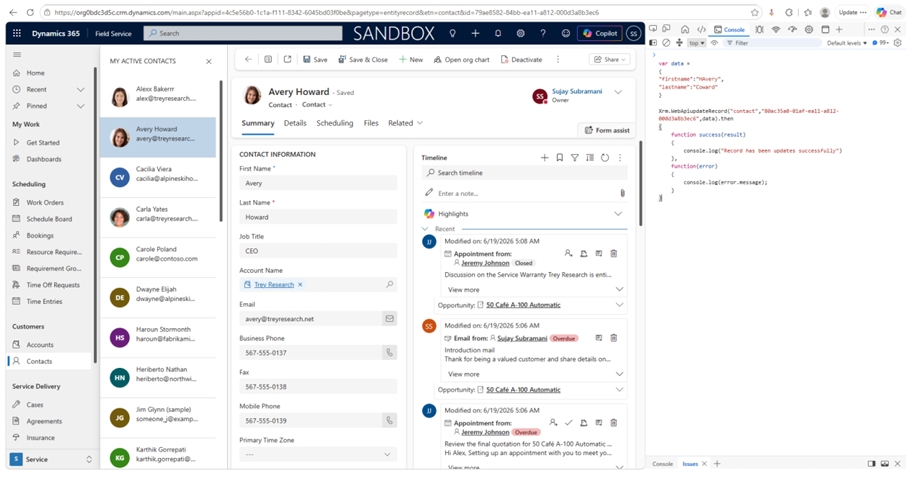
You can open the browser’s Developer Tools (F12) while using a Model-Driven App and execute the following code directly in the Console:
| var data = { firstname: “Alexx”, lastname: “Bakerrr” }; Xrm.WebApi.updateRecord( “contact”, “80ac35a0-01af-ea11-a812-000d3a8b3ec6”, data ).then( function () { console.log(“Record updated successfully.”); }, function (error) { console.log(error.message); } ); |
This approach is extremely useful during development for validating API calls before integrating them into ribbon buttons, form events, or custom web resources.
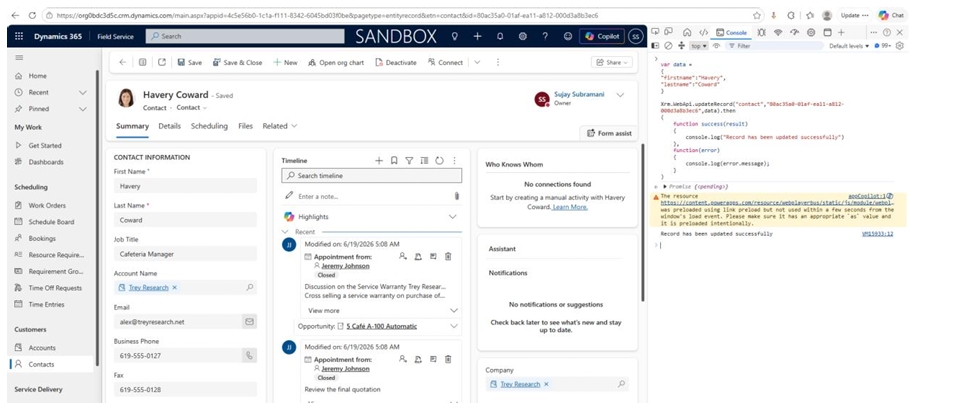
Pasting the code in Developer Tools in a web browser:
Output
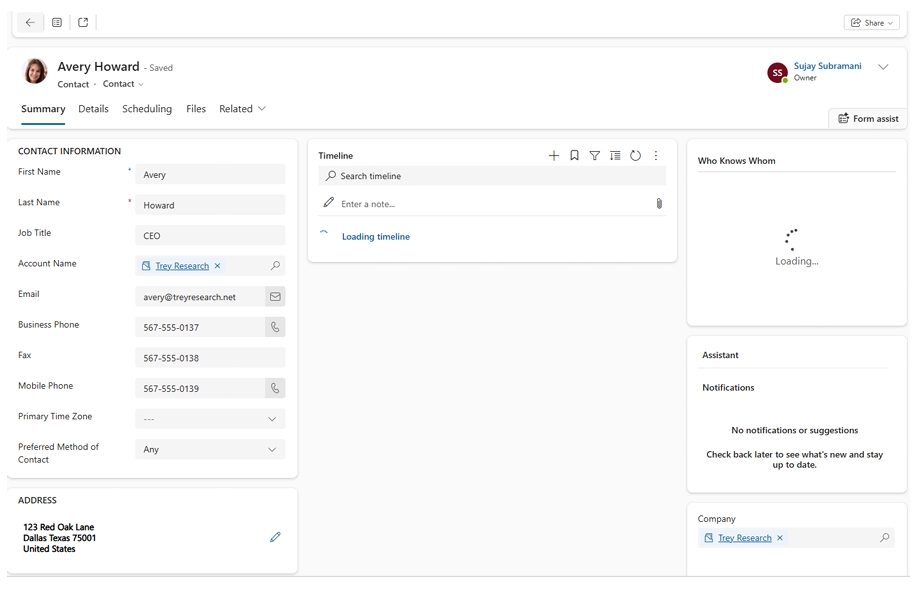
Before:
Check the first name and last name before API execution:
After:
Check the first name and last name now:
Where Can Xrm.WebApi Be Used?
The Dataverse Web API is commonly used in:
- Ribbon button commands
- Form OnLoad events
- Form OnSave events
- OnChange event handlers
- HTML Web Resources
- PCF Controls
- Custom JavaScript libraries
- Client-side validations
- Integration scenarios with external systems
When Should You Use Xrm.WebApi?
Choose Xrm.WebApi when:
- You need to create, update, retrieve, or delete Dataverse records from client-side JavaScript.
- You’re developing custom ribbon buttons or form scripts.
- You want to automate updates without requiring users to edit records manually.
- You need to interact with Dataverse while respecting security and server-side business logic.