How to enable Document Handling for a user
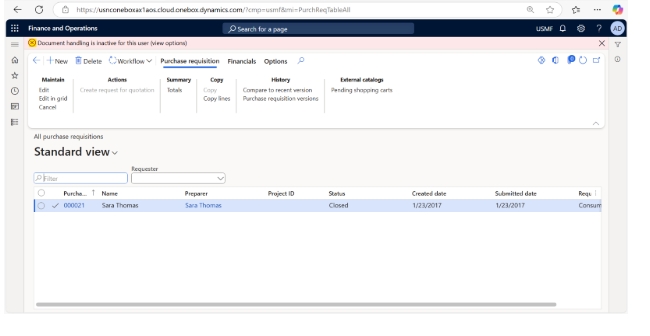
Scenario: I have created a purchase requisition order and was trying to attach document notes corresponding to the purchase requisition header then I started getting error “Document handling is inactive for this user (view options)”.
Error:
High level resolution steps
- Navigate to User Options.
- Activate the document handling.
Detailed resolution steps
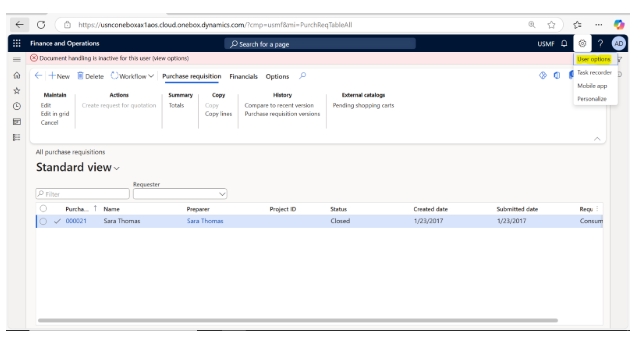
Step 1: Navigate to the “User Options” by clicking on the settings icon in the top-right corner of the default
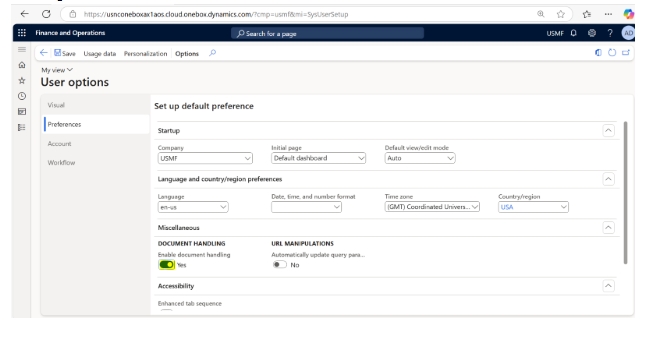
Step 2: Click on the “Preferences” pane, and under the “Miscellaneous” tab, enable Document Handling.
Output:
Once Document Handling is enabled, the user will be able to access the Attachments screen.