How to write a lookup method for filtering and excluding values using a container.
High level resolution steps
- Write Lookup method
- Create Helper class and method to exclude the values
Scenario
Write a lookup method for excluding values using a container, you need to initialize a query for the relevant table, use a container to specify which IDs to exclude, and then display the filtered results in a user-friendly interface.
Detailed resolution steps
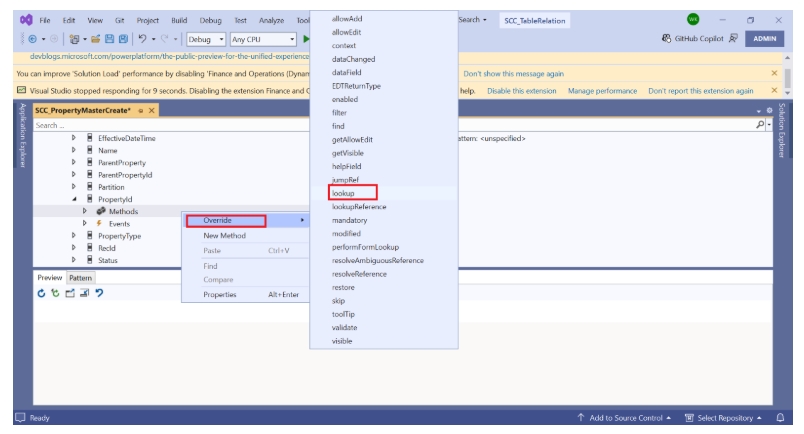
Step 1: Goto ->Form->Datasource->Field ->Right click -> override -> lookup.
Step 2: write the below code for lookup.
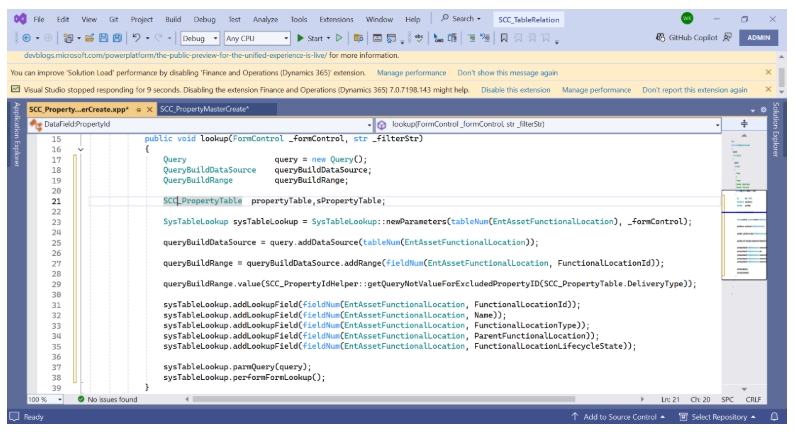
public void lookup(FormControl _formControl, str _filterStr)
{
    Query                   query = new Query();
    QueryBuildDataSource    queryBuildDataSource;
    QueryBuildRange         queryBuildRange;

    SCC_PropertyTable       propertyTable, sPropertyTable;

    SysTableLookup          sysTableLookup =
    SysTableLookup::newParameters(tableNum(EntAssetFunctionalLocation), _formControl);

    queryBuildDataSource = query.addDataSource(tableNum(EntAssetFunctionalLocation));
    queryBuildRange = queryBuildDataSource.addRange(fieldNum(EntAssetFunctionalLocation,
    FunctionalLocationID));

    queryBuildRange.value(SCC_PropertyHelper::
    getQueryValueFieldPropertyID(SCC_PropertyTable.DeliveryType));

    sysTableLookup.addLookupField(fieldNum(EntAssetFunctionalLocation, FunctionalLocationID));
    sysTableLookup.addLookupField(fieldNum(EntAssetFunctionalLocation, Name));
    sysTableLookup.addLookupField(fieldNum(EntAssetFunctionalLocation, FunctionalLocationType));
    sysTableLookup.addLookupField(fieldNum(EntAssetFunctionalLocation, ParentFunctionalLocation));
    sysTableLookup.addLookupField(fieldNum(EntAssetFunctionalLocation, FunctionalLocationLifecycleState));

    sysTableLookup.parmQuery(query);
    sysTableLookup.performFormLookup();
}
Code Explanation:
- Create a new query object to fetch data.
- Create variables: QueryBuildDataSource and range for the QueryBuildRange.
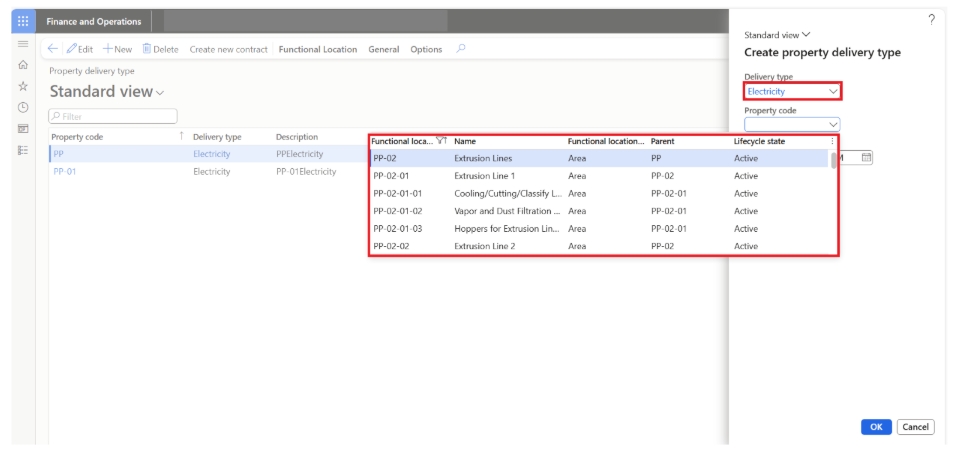
- Create a lookup for the EntAssetFunctionalLocation table, which allows users to select from it.
- Add the EntAssetFunctionalLocation table as the main source of data for the query.
- Set a filter on the FunctionalLocationId field to narrow down results.
- Call a helper method to find IDs that should be excluded from the results.
- Specify which fields (like ID, Name, and Type) should be shown in the lookup for easier selection.
- Connect the constructed query to the lookup so it knows what data to display.
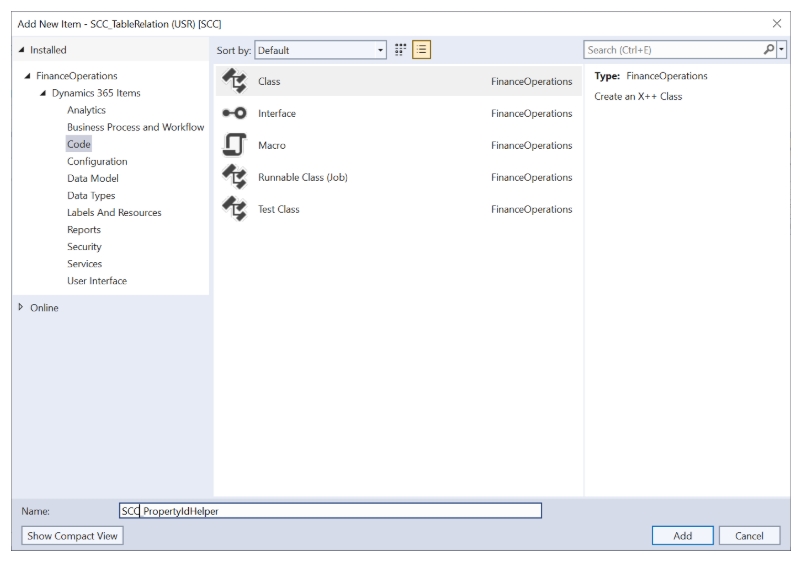
Step 3: create a new class as “SCC_PropertyHelper”
Step 4: write the below code
internal final class SCC_PropertyIdHelper
{
    public static str getQueryNotValueForExcludedPropertyID(SCC_DeliveryCode _deliveryCode)
    {
        container               excludedValues;
        SCC_PropertyTable       propertyTable;
        EntAssetFunctionalLocation entAssetFunctionalLocation;

        while select propertyTable
            where propertyTable.DeliveryType == _deliveryCode
        {
            while select entAssetFunctionalLocation
                where entAssetFunctionalLocation.FunctionalLocationId == propertyTable.PropertyId
                   && entAssetFunctionalLocation.FunctionalLocationActive == NoYes::Yes
            {
                excludedValues += entAssetFunctionalLocation.FunctionalLocationId;
            }
        }

        return queryNotValueCon_W(excludedValues);
    }
}
Code Explination:
- Create the new Helper class “SCC_PropertyIdHelper”.
- Create the new method “getQueryNotValueForExcludedPropertyID” method to return a string and take a SYN_DeliveryCode parameter.
- Declare a container for excluded values, and variables for property and functional location tables.
- Use a while loop to select records from propertyTable where DeliveryType matches the provided _deliveryCode.
- Store matching values in container “excludeValue”
- Return the result of the queryNotValueCon_W function, passing the excludedValues container
| internal final class SCC_PropertyIdHelper { [QueryRangeFunction] public static str getQueryNotValueForExcludedPropertyID(SYN_DeliveryCode _deliveryCode) { container excludedValues; SCC_PropertyTable propertyTable; EntAssetFunctionalLocation entAssetFunctionalLocation; while select propertyTable where propertyTable.DeliveryType == _deliveryCode { while select entAssetFunctionalLocation where entAssetFunctionalLocation.FunctionalLocationId == propertyTable.PropertyId && entAssetFunctionalLocation.FunctionalLocationActive == NoYes::Yes { excludedValues += entAssetFunctionalLocation.FunctionalLocationId; } } return queryNotValueCon_W(excludedValues); } } |
Output
Pass the values in Dialog Click on Ok button.